
 Too Long; Didn't Read
If you have spent any time in the world of Linux or enterprise storage, you have heard the whispers.
People don’t just use ZFS; they evangelize it.
They treat it less like a piece of software and more like a religion.
Why?
Because traditional file systems (like EXT4, XFS, or NTFS) are stuck in the past.
They blindly trust the hardware they sit on. ZFS does not.
ZFS assumes your hardware will fail, your cables will rot, and cosmic rays will flip bits in your RAM. And it is designed to save you from all of it.
In this series, we are going to strip away the complex jargon and walk through ZFS from “Hello World” to “Enterprise Architect.”
The Old Way vs. The ZFS Way
To understand ZFS, you have to unlearn how you think about storage.
In the old days (Hardware RAID), you had to decide exactly how many hard drives you wanted, configure them into a rigid array, and then format a partition on top of it. It was inflexible. If you wanted to expand, you often had to rebuild the whole array.
ZFS changes the game by combining the File System and the Volume Manager.
The “Pool” Analogy
Imagine your storage is a Swimming Pool (The ZFS Pool).
- Hard Drives: These are just buckets of water. You can dump as many buckets (drives) as you want into the pool.
- The Data: This is the water. It floats freely in the pool. It doesn’t care which specific bucket it came from; it just fills the available space.
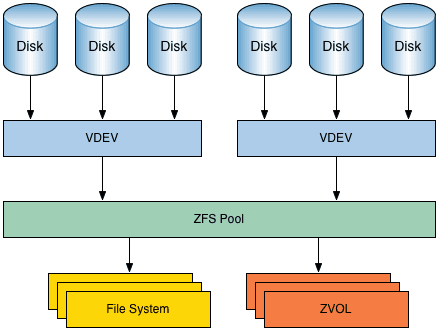
If you run out of space, you don’t need to rebuild the pool. You just walk up with another bucket (Hard Drive) and pour it in. The pool gets bigger instantly.
The Silent Killer: Bit Rot
Here is the scary reality: Your hard drive is lying to you.
Data on magnetic platters degrades over time. A “0” flips to a “1” due to magnetic drift or a minor firmware bug. This is called Bit Rot.
On a standard file system, when you open a corrupted photo, the file system asks the drive for the data. The drive hands back the corrupted file. The file system says, “Thanks!” and shows you a broken image. It has no way of knowing the data is wrong.
How ZFS Fixes It (The Self-Healing Magic)
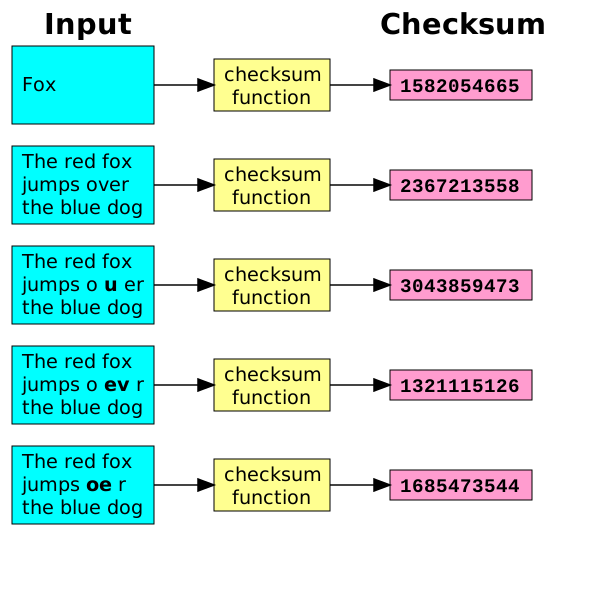
ZFS creates a Checksum (a unique digital fingerprint) for every single block of data you write.
- When you save a file, ZFS calculates its fingerprint and writes it down in a separate location.
- When you open that file a year later, ZFS reads the data and re-calculates the fingerprint.
- The Magic Moment: If the new fingerprint doesn’t match the old one, ZFS knows the data is corrupted.
- If you have redundancy (like a Mirror or RAIDZ), ZFS silently fetches the good copy from another drive, repairs the bad sector, and hands you the pristine file. You won’t even know it happened.
Pro-Tip: This is why ECC (Error Correcting Code) RAM is highly recommended for ZFS. ZFS trusts your RAM implicitly. If your RAM flips a bit before ZFS writes it to disk, ZFS will dutifully write the corrupted data and checksum it as "valid."
Copy-On-Write (COW): No More “Overwrite”
Most file systems are destructive. When you edit a document and hit “Save,” the file system physically overwrites the old data on the disk with the new data. If the power cuts out exactly in the middle of that write… poof. Your file is corrupt.
ZFS is a Copy-On-Write system.
- It never overwrites live data.
- When you save edits, ZFS finds a new empty space on the disk and writes the new version there.
- Only after the new version is successfully written does ZFS update the metadata pointer to say, “The current version is now over here.”
This means the file system is effectively crash-proof. If the power dies mid-write, the old data is still there, 100% intact.
Coming Up in Part 2…
Now that you know why ZFS is the superior choice for your data, it’s time to get your hands dirty. In the next part, we will cover:
- VDevs explained: The building blocks of your pool.
- RAIDZ levels: Why RAIDZ1 is (usually) a bad idea for large drives.
- Commands: Creating your very first zpool.








[…] are designed. Understanding them is essential because nearly every modern storage technology, from ZFS to distributed object storage, builds on the same philosophical […]